Using OGR Slip2D with an AI agent
OGR Slip2D includes an official Model Context Protocol server, developed in the same repository as the solver. Through it, an agent can open the program, build a model and analyse it, then go through the results slice by slice or look at an image of them. It all runs on your computer, and if OGR Slip2D is open you can follow each step in its window.
OGR Slip2D is one of the first geotechnical programs with an official MCP server. To our knowledge (October 2026), it is also the first open-source slope-stability program to ship one. Any MCP client can use it, and with a local model nothing leaves your computer.
Server since OGR Slip2D 0.1.195 · window bridge since 0.1.207
The program's operations as MCP tools
The Model Context Protocol is an open standard for connecting applications based on language models to other programs. OGR Slip2D publishes its operations as MCP tools that any compatible client can call, while the engineering judgement stays with you.
A whole model in one call
Geometry, materials, the region each material occupies and the water table can be defined from a description or taken from a DXF drawing. Any edit can be undone in one step.
The same engine as the desktop program
Limit equilibrium with any of the nine methods and seven searches, finite-element groundwater, probabilistic analysis, back analysis and optimisation. Calculations run as background jobs, and any of them can be cancelled.
Numbers and images
Critical surfaces with their slices, the queries of the interpretation window, error codes and groundwater fields. The agent can also ask for a PNG of the model, or of the canvas as it appears on screen, and look at it.
An agent models and analyses a 16 m slope
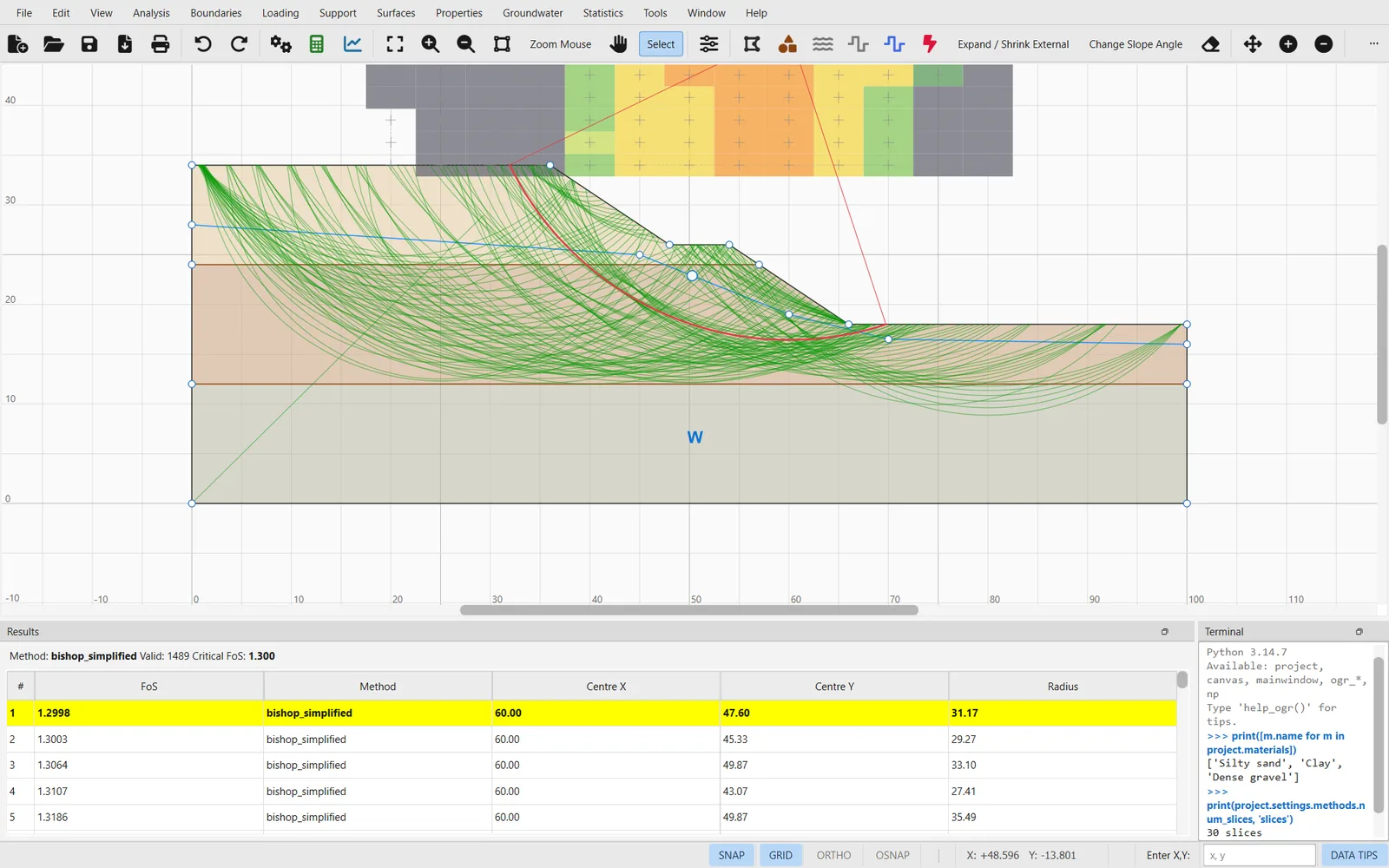
The slope on the home page was built in this exchange. The agent made five calls, starting with server_info, and the numbers in its answers come from OGR Slip2D.
model_definebuilt the 16 m slope: three materials, two contacts and a water table assigned to all three.analysis_configureset the methods, the grid search, 30 slices and the direction of failure.- In a background job,
analysis_runevaluated 1 859 circles with each method. results_getreturned the critical surfaces with their slice tables.
Installing the server and connecting a client
You need Python 3.11 or newer and an MCP client. The server is part of the OGR Slip2D package, so it does not have to be downloaded separately. In the examples below, replace C:\path\to\projects with the folder where you keep your .ogr models.
-
Install OGR Slip2D with the MCP extra
The
[mcp]extra adds the official MCP SDK for Python (MIT licence), which the server needs and the desktop program does not.git clone https://github.com/samuelsl27/OGR-Slip2D.git cd OGR-Slip2D python -m venv .venv .venv\Scripts\activate # macOS / Linux: source .venv/bin/activate pip install -e ".[mcp]" ogr-slip2d-mcp --versionIf
ogr-slip2d-mcpis not on the client'sPATH, give the full path of the executable, or runpython -m ogr_mcp, which starts the same server. -
Register the server in your client
Edit
claude_desktop_config.json, which is in%APPDATA%\Claude\on Windows and in~/Library/Application Support/Claude/on macOS; the Microsoft Store version keeps it in%LOCALAPPDATA%\Packages\Claude_<id>\LocalCache\Roaming\Claude\. Restart Claude afterwards.{ "mcpServers": { "ogr-slip2d": { "command": "ogr-slip2d-mcp", "args": ["--workdir", "C:\\path\\to\\projects"] } } }If Claude cannot find the command, put the full path of
ogr-slip2d-mcp.exe(inside your virtual environment'sScriptsfolder) incommand.One command registers the server for Claude Code:
claude mcp add ogr-slip2d -- ogr-slip2d-mcp --workdir "C:\path\to\projects"Claude Code asks for confirmation before each tool call. Leave that confirmation on for
python_exec(see Security).LM Studio reads the MCP servers for its local models from
%USERPROFILE%\.lmstudio\mcp.jsonon Windows, or from~/.lmstudio/mcp.jsonon macOS and Linux:{ "mcpServers": { "ogr-slip2d": { "command": "ogr-slip2d-mcp", "args": ["--profile", "compact", "--workdir", "C:\\path\\to\\projects"] } } }With small models, use
--profile compact. It publishes 14 tools instead of 74:model_definebuilds the geometry in one call andpython_execcovers the rest. A small model gets lost among many tools, and each tool description takes up context in every request.Ollama serves models but does not speak MCP itself; that is the job of the client that uses the model. With mcp-client-for-ollama, or any MCP client that accepts the
mcpServersformat, the entry is the same as for LM Studio:{ "mcpServers": { "ogr-slip2d": { "command": "ogr-slip2d-mcp", "args": ["--profile", "compact", "--workdir", "C:\\path\\to\\projects"] } } }Open WebUI connects to MCP servers over HTTP only (Streamable HTTP, Open WebUI 0.6.31 or newer). Start the server with a token:
ogr-slip2d-mcp --transport http --port 8765 --token-file token.txt --workdir "C:\path\to\projects"Then, in Open WebUI, go to Settings → Admin → Integrations → External Tool Servers → + Add Connection and set the type to MCP (Streamable HTTP), the URL to
http://127.0.0.1:8765/mcpand the authentication to Bearer, with the token as the key.Without
--token-fileorOGR_MCP_TOKEN, the server generates a token and prints it when it starts. If Open WebUI runs in Docker, usehttp://host.docker.internal:8765/mcpand start the server with--host 0.0.0.0and an explicit token; with that host and no token, the server refuses to start.Read this firstChatGPT only connects to public HTTPS servers, through OAuth. Exposing the server to the Internet also exposes
python_exec, and with it your machine, so do it only when you need to and stop the tunnel when you have finished.1. Start the server on loopback with a token of at least 32 characters and the public address of your tunnel:
ogr-slip2d-mcp --transport http --port 8765 --token-file token.txt --public-url https://YOUR-TUNNEL.example --workdir "C:\path\to\projects"2. Put a tunnel that terminates HTTPS in front of
http://127.0.0.1:8765. For example,cloudflared tunnel --url http://127.0.0.1:8765gives you the address for--public-url(restart the server with it).3. In ChatGPT, enable developer mode and create a connector with the address
https://YOUR-TUNNEL.example/mcpand OAuth authentication.4. ChatGPT sends you to the server's
/approvepage, where you check that the client is the one you expect and type the token fromtoken.txt. The server acts as its own OAuth 2.1 authorisation server (PKCE, dynamic registration). Access tokens last one hour and are kept only in memory.With the OpenAI Agents SDK for Python, the server is used as a stdio MCP server:
from agents import Agent, Runner
from agents.mcp import MCPServerStdio

async with MCPServerStdio(
    params={"command": "ogr-slip2d-mcp",
            "args": ["--workdir", r"C:\path\to\projects"]},
    client_session_timeout_seconds=60,   # an analysis can take a while
) as ogr:
    agent = Agent(name="geotechnics", mcp_servers=[ogr],
                  instructions="Analyse slopes with OGR Slip2D.")
    result = await Runner.run(agent, "Build and analyse the slope ...")
Set
client_session_timeout_secondsexplicitly. The SDK's default is a few seconds, whileanalysis_runwaits up to 30 s by default before returning a job to poll withjob_get.Clients that integrate tools through OpenAPI (for example BionicGPT) can use mcpo, which turns an MCP server into an OpenAPI service. Install it in a separate environment, pinned to the 1.x MCP SDK it was built for:
python -m venv mcpo-env
mcpo-env\Scripts\pip install mcpo "mcp<2"
mcpo-env\Scripts\mcpo --port 8000 --api-key "your-key" -- ogr-slip2d-mcp --workdir "C:\path\to\projects"
The specification is then served at
http://localhost:8000/openapi.json, with interactive documentation at/docs.model_renderreturns a data URI; passsave_pathif you also want the PNG on disk. -
Check the connection
Ask the agent to call
server_info. The reply gives the version, the units (SI) and the published tools, and says whether the next call will go to an open OGR Slip2D window or to a model held by the server.{"server": "ogr-slip2d", "units": "SI: m, kN, kPa, kN/m3, degrees", "profile": "full", "attached_to_window": {"window_open": true, "next_call_goes_to": "the open window"}, "program_coverage": {"mapped": 116, "pending": 0}, "licence": "AGPL-3.0-or-later", …}
The agent works in your window
If OGR Slip2D is open, whatever you ask the agent is done in that window, whichever client you use and whether you opened the program or the client first. The program starts its agent bridge when it opens, so no further configuration is needed.
- Each edit the agent makes is one step of Edit → Undo, and the canvas is redrawn after it.
- An analysis started by the agent appears in the results panel and on the canvas, as it does when you press Compute.
project_newandproject_openrefuse to run while there are unsaved changes, so the agent cannot discard your work.- The bridge listens only on 127.0.0.1, with a new random token each time it starts. You can turn it off in Tools → Agent bridge (MCP) or start the program with
--no-agent-bridge.
74 tools covering 116 menu actions
The server gives access to all the modelling and analysis actions in the program's menus. The ones it leaves out only concern the view (zoom, pan, print). For small local models, the compact profile publishes 14 of the 74 tools.
| Group | What it covers | Examples |
|---|---|---|
| Project | Create, open, save, describe and validate models | project_new · project_summary · project_validate |
| Model | The whole model in one call; boundaries, materials, regions; reshape the outline or change the slope angle; geometry clean-up | model_define · boundary_edit · slope_angle_change |
| Loads | Distributed and line loads, pseudo-static seismic loading, acceleration records | load_set · seismic_set |
| Supports | Support types, single supports and patterns | support_type_set · support_pattern_add |
| Search | Tension crack water, focus objects, user surfaces | focus_set · user_surface_add |
| Groundwater | Hydraulic properties, mesh, boundary conditions, transient stages, pressure grids, solve, read the field, drawdown sweep | mesh_generate · groundwater_run |
| Statistics | Random variables, probabilistic and sensitivity runs, back analysis, optimisation | statistics_run · back_analysis_run |
| Analysis | Settings, background runs, jobs, results, the interpretation window's queries, a single surface | analysis_run · results_query · surface_evaluate |
| Files | DXF in and out, PDF report, import properties from another model | dxf_import · report_generate |
| View & Python | PNG of the model or of the canvas on screen, undo history, Python for anything else | model_render · project_history · python_exec |
Security and network access
The server always publishes python_exec, which runs Python with your user's permissions and covers anything that does not have a tool of its own yet. Anyone who can talk to the server can therefore run code on your machine, so by default only you can reach it.
- stdio (Claude, LM Studio, the Agents SDK): the server runs as a child process of the client and opens no port. The remaining risk is prompt injection, so keep the client's confirmation before each tool call.
- HTTP: a token is always required, even on 127.0.0.1, and it is compared in constant time. The Host and Origin headers are checked to prevent DNS rebinding. Without a token there is no network access.
- Internet (
--public-url): OAuth 2.1 with PKCE, a rate-limited approval step and tokens held only in memory. The server never opens a tunnel by itself. - No telemetry: the server makes no network calls of its own.
Example requests
Give the agent the engineering data (geometry, strengths, water) and ask for the checks you would make yourself. All units are SI.
“Open dam.dxf, tell me which layers you would import as external and material boundaries, and import them.”
“Run Bishop, Spencer and Morgenstern–Price with a grid search and tell me whether they agree on the critical circle.”
“Mesh the dam, put the reservoir at 17 m, solve the steady seepage and use that pore pressure in the downstream slope.”
“Make c′ and φ′ of the clay normal with a 15 % and 8 % coefficient of variation, correlated −0.5, and give me the probability of failure.”
“Which horizontal support force at elevation 4 m brings the critical factor of safety to 1.3?”
“Save the model, export the critical surfaces to DXF and generate the PDF report of the last analysis.”
Frequently asked
Does my model leave my computer?
The server makes no network calls. A model provider receives whatever your client sends it, as in any other conversation. With a local model (LM Studio, Ollama), nothing leaves your machine.
Which models can use it?
Any client that speaks MCP. Large hosted models handle the full 74-tool profile well; for small local models, start the server with --profile compact.
Can the agent break my model?
Each edit is an undo step. A script run with python_exec counts as one step and is rolled back if it fails, and the agent cannot open or create a model while there are unsaved changes. Settings that the calculation would not read are rejected with the reason, instead of being stored.
Is the agent's answer an engineering result?
The numbers come from the same engine as the desktop program and need the same checks: independent calculations, the sensitivity of the result to the inputs, and engineering judgement. Responsibility for a design lies with the engineer who signs it, whether the model was built by hand or by an agent.